
티스토리 뷰
[React]
⦁ node: 12.13.1
⦁ npm: 6.12.1
⦁ port: 3000
1. webpack.config.js
...

devServer: {
    port: 3000,
    inline: true,
    proxy: {
      "/api": {
        target: "http://localhost:8080",
      },
    },
  },

...
2. Index.jsx
import React, { useState } from "react";
import axios from "axios";

const Index = () => {
  const [fetchMessage, setFetchMessage] = useState("");
  const [axiosMessage, setAxiosMessage] = useState("");

  // 둘 중에 원하는 걸 사용한다.
  const helloFetchApi = () => {
    fetch("/api/fetch")
      .then((response) => response.text())
      .then((text) => setFetchMessage(text));
  };

  const helloAxiosApi = () => {
    axios
      .get("/api/axios")
      .then((response) => response.data)
      .then((data) => setAxiosMessage(data));
  };

  return (
    <>
      <div>
        <button type="button" onClick={helloFetchApi}>
          {fetchMessage !== "" ? fetchMessage : "버튼을 눌러주세요."}
        </button>
      </div>
      <div>
        <button type="button" onClick={helloAxiosApi}>
          {axiosMessage !== "" ? axiosMessage : "버튼을 눌러주세요."}
        </button>
      </div>
    </>
  );
};

export default Index;
[Spring Boot]
⦁ version: 2.3.1
⦁ port: 8080
1. IndexController.java
import org.springframework.web.bind.annotation.GetMapping;
import org.springframework.web.bind.annotation.RequestMapping;
import org.springframework.web.bind.annotation.RestController;

@RestController
@RequestMapping("/api")
public class IndexController {

    @GetMapping("/fetch")
    public String fetch() {
        return "Hello Fetch";
    }

    @GetMapping("/axios")
    public String axios() {
        return "Hello Axios";
    }
}
1. 위의 코드를 작성한다.
2. 각 서버를 켠다.
3. 버튼을 눌러 확인한다.
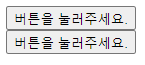
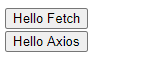
개발 환경에서 위와 같이 했을 때, CORS의 문제는 없었다.
운영 환경에선 아직 해보지 않았다. 나중에 해보고 문제가 있으면 수정해보자.
'프로젝트' 카테고리의 다른 글
| [Error] JUnitException: TestEngine with ID 'junit-vintage' failed to discover tests (0) | 2020.06.30 |
|---|
댓글
공지사항
최근에 올라온 글
최근에 달린 댓글
- Total
- Today
- Yesterday
링크
TAG
- Algorithm
- 이것이 코딩테스트다
- 열혈강의
- dfs
- repository
- 정렬
- git
- Algorihtm
- 알고리즘
- 그래프
- 2020 카카오 인턴십
- 구현
- BOJ
- 그리디
- DP
- 자료구조
- Summer/Winter Coding(~2018)
- binary search
- 백준
- Python
- 2019 카카오 개발자 겨울 인턴십
- bfs
- 코틀린
- Idempotent
- 단계별로 문제풀이
- spring boot 2.3.1
- 깃
- 저장소
- programmers
- OS
| 일 | 월 | 화 | 수 | 목 | 금 | 토 |
|---|---|---|---|---|---|---|
| 1 | 2 | 3 | 4 | 5 | 6 | 7 |
| 8 | 9 | 10 | 11 | 12 | 13 | 14 |
| 15 | 16 | 17 | 18 | 19 | 20 | 21 |
| 22 | 23 | 24 | 25 | 26 | 27 | 28 |
글 보관함